Security
The Security tab lets you make security settings.
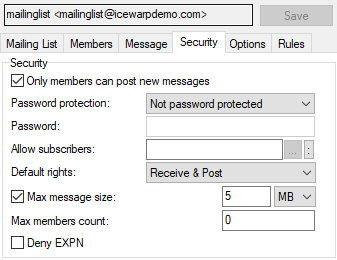
Figure. Mailing list level management: Security tab.
|
Field |
Description |
|---|---|
|
Only members can post new messages |
Check this option to stop non-members of the mailing list from sending messages to the mailing list. Note: This option does not override any member rights set in Members. A member must also have posting rights to be able to post. Note: If you do not check this option then anyone can send a message to the mailing list and it will be accepted (after usual rules, Antispam and IceWarpAntivirus checking). Note: One can forge the sender as being one of the list members and be able to send. To avoid it, use the Reject if originators domain is local and not authorized option (Mail Service > Security > General). |
|
Password protection |
Select a level of password protection you require for this mailing list.
There are two types of moderated lists which require a password to be included either at the beginning of the Subject: header, or in the X-Approved MIME header. The difference between the two types is in the way that a message is treated when no password is given:
Note: Some mail clients support the X-Approved MIME header which can contain the password. IceWarp Server will automatically check that header and allow the message if the password is correct. |
|
Password |
The password which IceWarp Server will check for. |
|
Allow subscribers |
As an extra security you can specify a fully qualified path to a file of addresses which are allowed to subscribe to this list. Use a single line for each address. |
|
Default rights |
Determines what rights a member will have if you chose Default rights for the member. Various combinations of the following options are available:
|
|
Max message size |
Select a maximum message size that can be sent. |
|
Max members count |
Specify a maximum number of members for this mailing list. Note: Limiting max members always applies to static members sources, such as all domain users or all system users. |
|
Deny EXPN |
Normally, if a client issues the EXPN command the list members will be returned. As a security precaution you can check this option and IceWarp Server will respond with a "No such Mailing List" message. |
Antispam and Quarantine for Mailing lists
Up to version 10.4.x, it is possible to enable Antispam and quarantine only for all mailing lists. Use the c_as_mailinglist_quarantine_disable and c_as_mailinglist_antispam_disable variables (console -File -Api Console).
For version 11.x, it is possible to enable/disable these features for individual mailing lists. Right-click the mailing list name (Domains and Accounts > Management > {domain} > Mailing Lists), select the API Console item and search for the m_as variable (for Antispam) and m_cr one (for quarantine). Set them properly.

