Conferencing
In this section you can change the conference application look: set the conferencing logo and the redirect link.
To upload the conferencing logo, click Upload  and choose an image from your computer. The image type should be: jpeg, jpg, png or gif and maximum size 20 MB.
Note: If you want to reset all changes in the conferencing logo, click Set to Default Values.
To set the URL address where the user will be redirected after finishing the conference, enter the link in the Redirect URL  field.
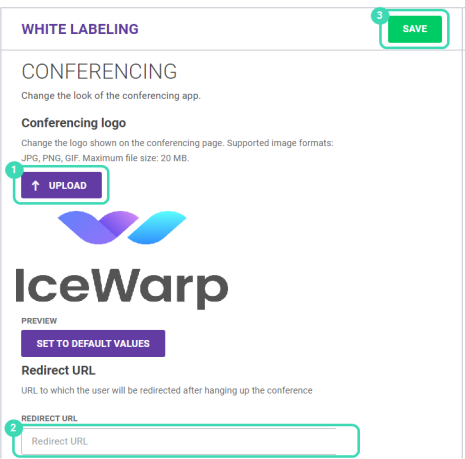
Figure. Conferencing white labeling.
To save the changes, click Save .
.
The conferencing logo will be displayed at the top left.

Figure. Conferencing logo.
To reset the settings, click Set to Default Values.

