Source Machine
In the Source Machine screen, specify the parameters for the Kerio Server.
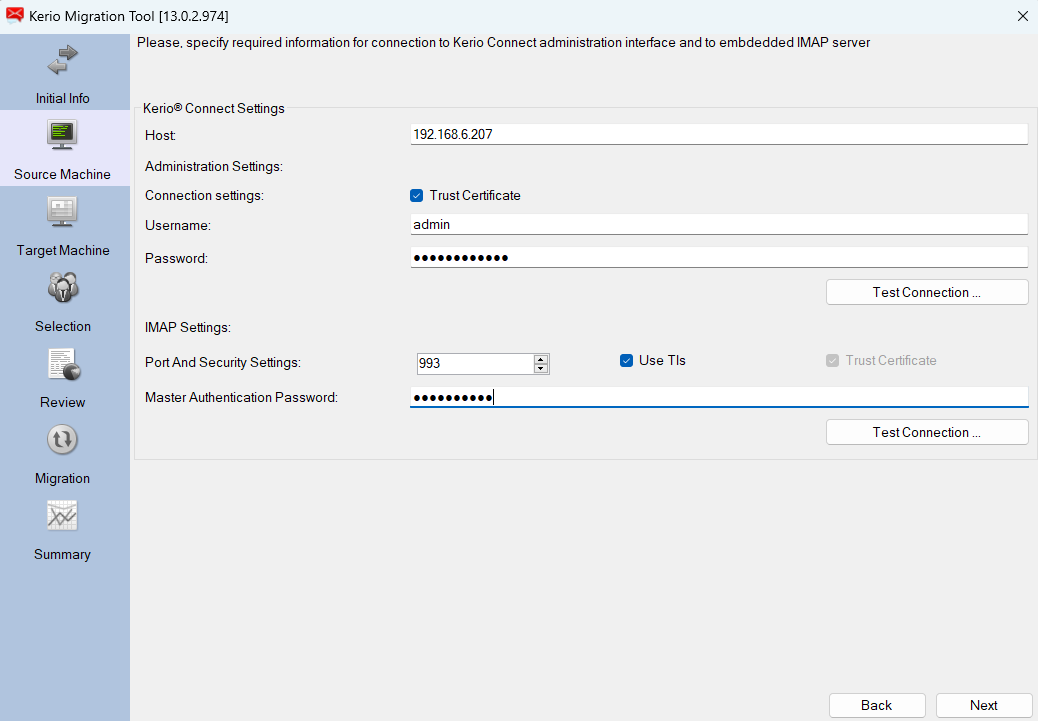
Figure. Source Machine.
Kerio Connect Settings
Administration settings
|
Field |
Action |
|---|---|
|
Connection Settings |
Trust Certificate is enabled. |
|
Username |
Enter the administrator password for the Kerio source server. |
|
Password |
Enter the administrator password for the Kerio source server. |
|
Test Connection |
Test the connection to verify the correct Host, Username and Password. |
IMAP Settings
|
Field |
Action |
|---|---|
|
Port |
Use 443 or 993. Use Tls is enabled with port 993. |
|
Master Authentication Password |
The password can be obtained in Kerio Admin section > Configuration > Other options > Master verification. |
|
Test connection |
Test the connection to verify the correct Host, Username and Password. |
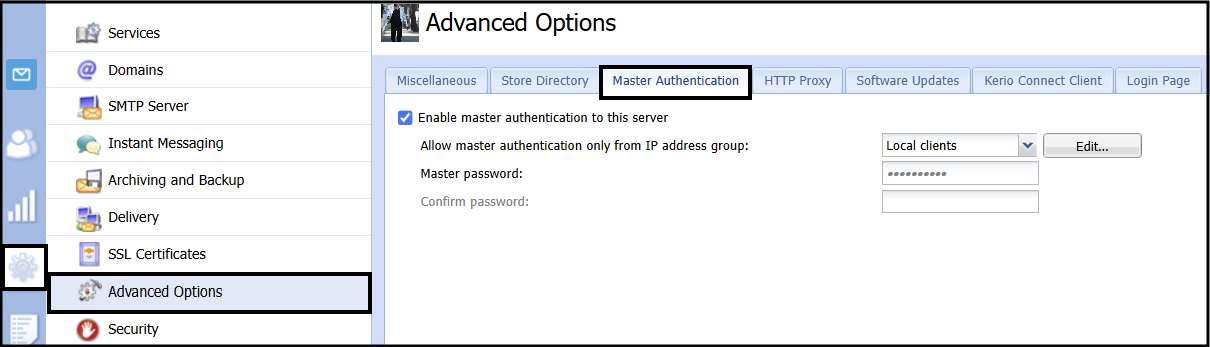
Figure. Kerio Administrator password route.

