How to send photos to the cloud
To free space on your mobile, store your precious memories in cloud. Send them to the Files & Documents folder.
IOS
-
Go to your gallery and select a photo.
-
Tap share
 .
. -
Go down through the list and tap Save to Files
 .
.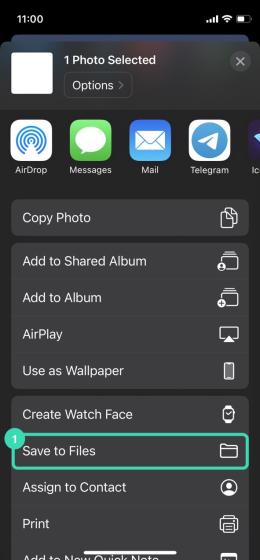
Figure. Save to files.
-
If you are not in a Browse
 list, tap Back
  in the left upper corner until you see it.
 -
Select
 IceWarp
  .
.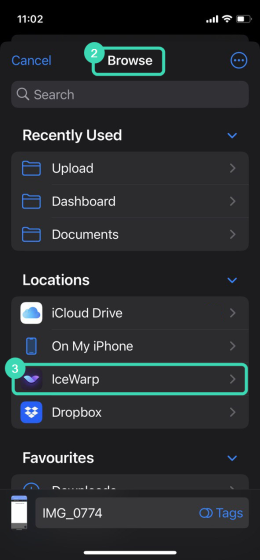
Figure. Save to files IOS.
-
Tap your account. The list of folders there repeats the list in Files & Documents.
-
Select a folder and click Save.
Android
-
Go to your gallery and select a photo.
-
Tap share
 .
. -
Select
IceWarp.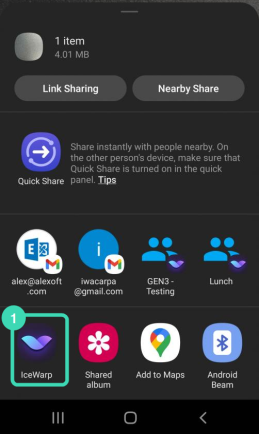
Figure. Save to files Android.
-
In the dialog "Send data to:", select IceWarp documents.
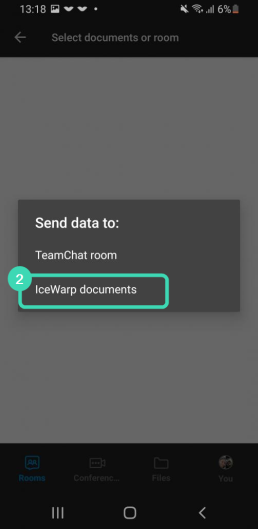
Figure. IceWarp documents.
-
Select the IceWarp account and a folder for storage.
-
Tap Upload.

